
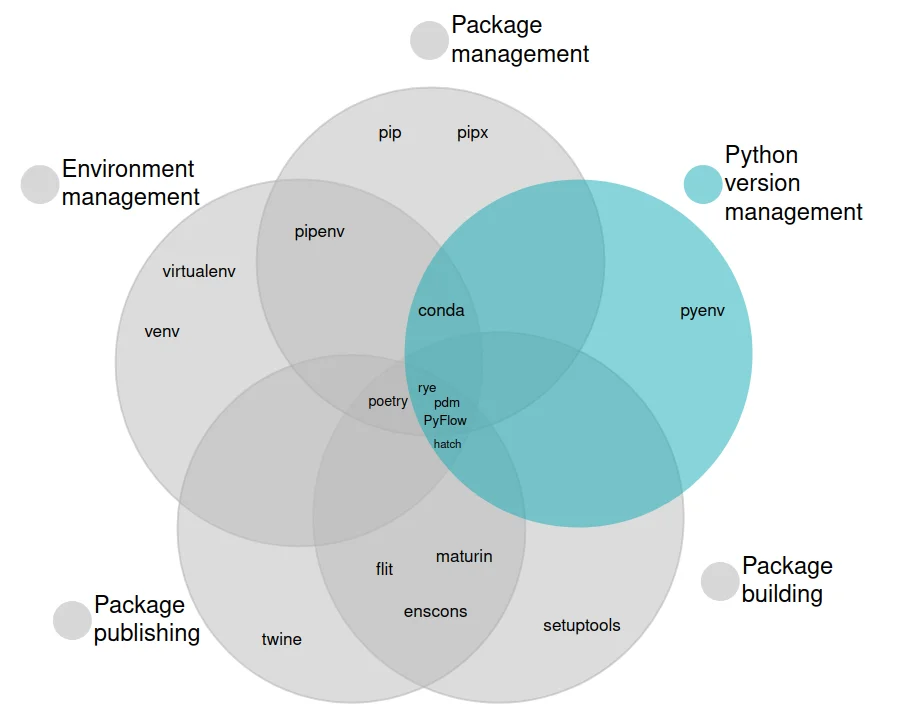
图片来源https://alpopkes.com/posts/python/packaging_tools/
Rye 是新一代 Python 包管理与虚拟环境一体化工具,内置 uv 后端加速依赖解析与安装。本文对比 pyenv、pip、uv、pdm 等方案的定位差异,并整理 Rye 安装、代理与 PyPI 镜像源配置、VSCode 解释器路径修复、全局 shims 启用及项目初始化的完整流程。
图片来源https://alpopkes.com/posts/python/packaging_tools/
{
"python.defaultInterpreterPath": ".\\.venv\\Scripts\\python.exe"
}
rye config --set proxy.http=http://127.0.0.1:7890
rye config --set proxy.https=http://127.0.0.1:7890
rye config --set-bool behavior.global-python=true
# Rye config.toml
[[sources]]
name = "default"
url = "https://pypi.org/simple/"
rye add ipykernel
[default]
toolchain = "cpython@3.13.2"
license = "MIT"
author = "bangwu <i@bangwu.top>"
[proxy]
https = "http://127.0.0.1:10808"
http = "http://127.0.0.1:10808"
[behavior]
global-python = true
autosync = true
use-uv = true
[[sources]]
name = "default"
url = "https://pypi.tuna.tsinghua.edu.cn/simple/"
rye pin 3.x
rye init // 或者 rye init -p cpython@3.x [project name]
rye sync
rye add [package]